
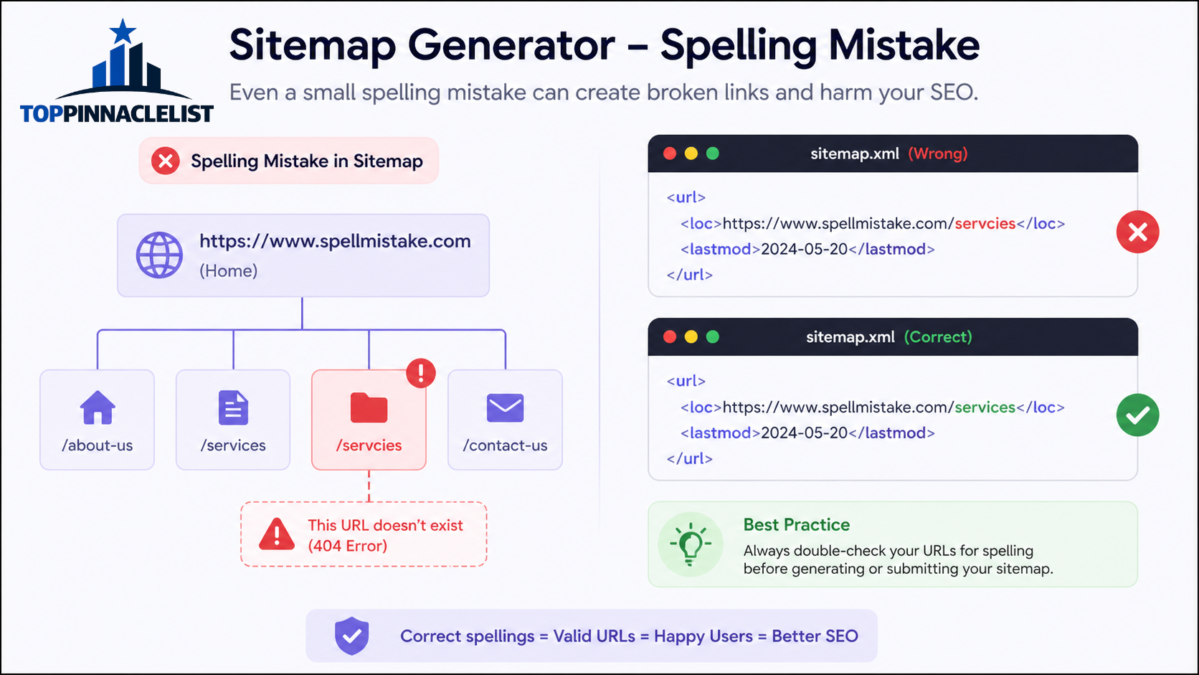

You generate a sitemap, submit it, and expect smooth indexing—but something feels off. Pages aren’t showing up, indexing is slow, or worse, your sitemap gets ignored. In many cases, the issue isn’t technical complexity—it’s a simple sitemap generator spellmistake that quietly breaks everything.
These small errors are easy to overlook, especially when using automated tools or plugins. A single misspelled URL, incorrect tag, or malformed structure can confuse search engines and reduce your site’s visibility. The frustrating part? Most tools don’t clearly warn you about these mistakes.
In this guide, you’ll learn how sitemap spelling mistakes happen, how they affect SEO, and how to fix them step by step. More importantly, you’ll understand how to prevent these issues in the future—even if you’re not a technical expert.
What Is a Sitemap and Why Accuracy Matters
A sitemap is a structured file that tells search engines which pages exist on your website and how they’re organized. It acts like a roadmap.
When everything is correct:
- Search engines crawl your site efficiently
- New pages get discovered faster
- Important pages are prioritized
When there are spelling mistakes or formatting issues:
- Pages may be skipped entirely
- Crawling becomes inefficient
- Indexing delays increase
The Reality Most People Miss
Search engines don’t “fix” your sitemap errors—they simply ignore problematic entries.
Common Sitemap Generator Spellmistakes
Let’s break down the most frequent issues that occur during sitemap generation.
1. Misspelled URLs
This is the most common problem.
Example:
- Correct:
/contact-us/ - Incorrect:
/contcat-us/
Why it matters:
Search engines treat these as completely different URLs. If the incorrect version doesn’t exist, it wastes crawl budget.
2. Incorrect Protocol (HTTP vs HTTPS)
Many generators accidentally mix protocols.
Example:
http://example.com/pagehttps://example.com/page
Impact:
- Duplicate entries
- Confusion about canonical version
- Lower ranking consistency
3. Wrong XML Tag Names
Even a small typo in XML tags can break the sitemap.
Example:
<loc>(correct)<loction>(incorrect)
Result:
Search engines may ignore entire sections of your sitemap.
4. Broken Encoding or Special Characters
URLs with spaces or special characters often get miswritten.
Example:
- Incorrect:
/best shoes/ - Correct:
/best%20shoes/
5. Inconsistent URL Structure
Sometimes URLs are technically correct but inconsistent.
Examples:
- With trailing slash vs without
- Mixed uppercase and lowercase
Why it matters:
Search engines may treat them as separate pages.
6. Auto-Generated Slug Errors
If your CMS auto-generates URLs, spelling mistakes in page titles can carry into the sitemap.
Real scenario:
A blog post titled “Beginners Guid to SEO” creates a slug:/beginners-guid-to-seo/
This error then spreads across your sitemap.
How Sitemap Spellmistakes Affect SEO
Many people underestimate the impact of small errors. Here’s what actually happens behind the scenes:
1. Crawl Budget Waste
Search engines allocate limited resources to your site. Wrong URLs consume that budget without delivering value.
2. Indexing Delays
If your sitemap points to incorrect or broken pages:
- Search engines spend time verifying them
- Real pages get delayed
3. Reduced Trust Signals
A clean sitemap signals professionalism and reliability. Errors suggest poor site maintenance.
4. Duplicate Content Risks
Incorrect variations of URLs can create duplicate indexing issues.
How to Detect Sitemap Generator Spellmistakes
You don’t need advanced tools to catch most errors.
Step-by-Step Method
- Open your sitemap manually
- Look for obvious typos in URLs
- Check random URLs
- Click them and confirm they load correctly
- Look for patterns
- Repeated misspellings often indicate a systemic issue
- Validate XML structure
- Ensure tags are properly formatted
- Review URL consistency
- Check protocol, slashes, and casing
Fixing Sitemap Errors (Practical Approach)
Step 1: Identify the Source
Ask:
- Is the error coming from your CMS?
- A plugin?
- A custom generator?
Fixing the root cause is critical.
Step 2: Correct URL Slugs
Update:
- Page titles
- Permalinks
- Redirects if needed
Step 3: Regenerate the Sitemap
Once errors are fixed:
- Generate a fresh sitemap
- Replace the old one
Step 4: Re-submit to Search Engines
After updating:
- Submit your sitemap again
- Monitor indexing behavior
Advanced Tips Most People Overlook
Insight 1: Sitemap Errors Often Come from Content Teams
It’s not always a technical issue. Writers and editors can introduce spelling mistakes that become permanent URLs.
Solution:
Create a simple URL naming checklist for your team.
Insight 2: Fixing a Sitemap Alone Doesn’t Fix Everything
If incorrect URLs were already crawled, they may still exist in search engine memory.
What to do:
- Use redirects for old incorrect URLs
- Ensure canonical tags are correct
Insight 3: Automation Can Amplify Mistakes
Automated sitemap generators are helpful—but they scale errors quickly.
One typo in a template can affect hundreds of URLs.
Practical Use Case
Imagine running an eCommerce store.
You generate a sitemap with 500 product pages. But due to a template error:
- “collection” is spelled as “colleciton” in all URLs
Result:
- 500 broken or incorrect entries
- Search engines struggle to index products
- Traffic drops
Fixing this manually later is much harder than catching it early.
Common Mistakes to Avoid
- Trusting sitemap generators blindly
- Ignoring small spelling inconsistencies
- Mixing URL formats
- Forgetting to update sitemap after changes
- Not testing URLs before submission
FAQ
What is a sitemap generator spellmistake?
It refers to errors like misspelled URLs, incorrect tags, or formatting issues created during sitemap generation. These mistakes can prevent search engines from properly crawling and indexing your pages.
Can spelling mistakes in a sitemap hurt SEO?
Yes, even small mistakes can waste crawl budget, delay indexing, and reduce search visibility. Search engines rely on accurate sitemaps to understand your site structure.
How do I check if my sitemap has errors?
You can manually review your sitemap by opening it in a browser, checking URLs, and ensuring all links work correctly. Also look for consistency in structure and formatting.
Should I fix old sitemap errors or just create a new one?
You should do both. Fix the source of the errors, regenerate a clean sitemap, and handle old incorrect URLs with proper redirects if needed.
Do sitemap generators automatically fix spelling issues?
No, most generators simply pull existing URLs from your site. If your URLs contain spelling mistakes, they will appear in the sitemap as-is.
Conclusion
A sitemap generator spellmistake might seem minor, but it can quietly damage your SEO performance. The biggest lesson here is simple: accuracy matters more than automation.
By regularly reviewing your sitemap, fixing errors at the source, and maintaining consistent URL structures, you can avoid common pitfalls and ensure search engines understand your site correctly.
Don’t treat your sitemap as a one-time task. Treat it as a living part of your SEO strategy—and you’ll see better indexing, cleaner crawling, and more reliable growth over time.